Maxly: A Bold, Colorful Display Font for Handmade Creators
I was halfway through designing a set of seasonal candle labels—think warm amber glass jars with linen wicks and earthy scent names—when I paused. The clean sans serif I’d used for years suddenly felt too quiet. Too safe. That’s when I opened Maxly.
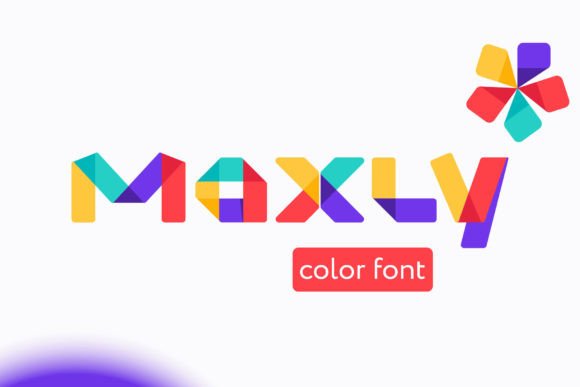
Maxly isn’t just another display font. It’s a color font—OpenType-SVG—which means each letter arrives pre-painted with vibrant, intentional hues: rich coral strokes, sunlit gold fills, deep indigo shadows, or soft sage gradients. No manual coloring needed. No layering in design software. Just type, and the magic shows up—alive, playful, and unmistakably handmade.
What makes Maxly work so well for real product making? Its personality. It’s bold without shouting, fun without feeling childish, and decorative without sacrificing clarity. The letterforms have generous spacing, friendly curves, and subtle texture—like hand-painted signage you’d spot at a local farmers’ market or boutique stationery shop. It doesn’t try to be everything; it’s built for moments that need presence: a greeting card headline, a wedding welcome board, a sticker sheet title, or the “New Arrivals” banner on your Etsy shop banner.
I tested Maxly across six physical and digital projects last month—and every time, it lifted the design. On matte-finish candle labels (3" x 2"), the color layers stayed crisp when printed on my Epson EcoTank. For a set of printable planner cover pages, Maxly added instant visual energy—no extra graphics needed. And when I mocked up a small-batch tote bag design (using a Cricut Explore Air 2), I discovered something practical: because Maxly is SVG-based, the colors export cleanly to cut files *if* your software supports OpenType-SVG (Cricut Design Space does, Silhouette Studio requires version 5.0+).
That said—readability matters. Maxly shines at sizes 24pt and up. On tiny stickers (under 1"), I switched to a supporting sans serif for body text but kept Maxly for the brand name. Same for product tags: “Honey Lavender” in Maxly, then scent notes in a clean, legible font like Montserrat or Lora. It’s not meant for paragraphs—but that’s exactly why it works so well as a display font. It gives your handmade goods a confident, curated voice.
Here’s where Maxly fits naturally into your workflow:
- Greeting cards & invitations: Use it for names, dates, or celebratory phrases (“You’re Invited”, “Happy Birthday”, “Just Married”). Pair with a delicate script for names and a neutral sans for details.
- Candle & soap labels: Perfect for scent names (“Salt + Sage”, “Vanilla Smoke”) or small-batch series titles (“Summer Edit”, “Holiday Glow”). Print-ready at 18–36pt on standard label stock.
- Digital printables: Wall art quotes, planner headers, or themed sticker sheets pop instantly—no color palette decisions required. Preview thumbnails look vibrant even at small sizes.
- Packaging & tags: Works beautifully on kraft paper, cream cardstock, or foil-stamped hang tags. The color contrast holds up whether you’re laser-printing or using a professional print service.
- Mugs, shirts & signs: When exported correctly (SVG or high-res PNG), Maxly maintains its richness on sublimation prints and vinyl cuts. Just remember to outline or rasterize before sending to production vendors who don’t support OpenType-SVG natively.
Font pairing is where Maxly truly sings. I keep a simple trio on hand: Maxly for impact, a warm sans serif (like Poppins or Inter) for clean supporting text, and occasionally a relaxed handwritten font (like Quicksand or Caveat) for personal notes or handwritten-style accents. No clashing. No over-designing. Just harmony.
Before using Maxly commercially—whether on physical products, digital templates, or social media graphics—take five minutes to review what’s included. Check for alternate characters, ligatures, or stylistic sets (some color fonts offer seasonal palettes or monochrome fallbacks). Confirm licensing covers your use case: selling printed goods, bundling in Canva templates, or embedding in PDF printables. Maxly is licensed for commercial use, but always verify file permissions—especially if you’re distributing editable design files or SVG cut files to customers.
One thing I love about working with Maxly is how it quietly elevates perceived value. A plain kraft gift tag becomes special with “Thank You” in Maxly’s sunset gradient. A simple printable wall quote feels gallery-worthy. Even listing images on Etsy or Instagram feel more cohesive—not because Maxly does all the work, but because it gives your brand a consistent, joyful anchor.
It also adapts beautifully to seasons. Swap out a summer palette (coral + mint) for deeper tones (burgundy + charcoal) in fall, or go soft and luminous (blush + ivory) for weddings. Since Maxly is a color font, those shifts happen inside the type itself—not through tedious recoloring.
If you’re new to color fonts, think of Maxly like a trusted craft supply: reliable, expressive, and ready to use. You don’t need advanced typography knowledge to get started—just a design app that supports OpenType-SVG (Adobe Illustrator, Photoshop CC 2017+, Affinity Designer, or modern versions of Canva and Figma). And if you're cutting with a machine, test one file first: import your Maxly text, convert to outlines or export as SVG, then do a quick test cut on scrap material.
At its heart, Maxly is more than a Fonts download—it’s a creative shortcut that honors the care you put into every handmade detail. It says “this was made with intention,” not just efficiency. Whether you're labeling small-batch candles, designing a digital sticker pack, or refreshing your shop’s seasonal packaging, Maxly helps your work stand out—not by being louder, but by feeling more authentically, unapologetically *yours*.